> For the complete documentation index, see [llms.txt](https://help.codegrade.com/llms.txt). Markdown versions of documentation pages are available by appending `.md` to page URLs; this page is available as [Markdown](https://help.codegrade.com/automatic-grading-guides/java/grading-with-maven.md).
# Grading with Maven
### Overview
This guide shows how to set up a Maven-based Java programming assignment in CodeGrade, using instructor-written JUnit tests and AutoTest for automated grading.
***
### Configuring AutoTest Setup
#### Install Java and Maven
In **AutoTest > Setup**:
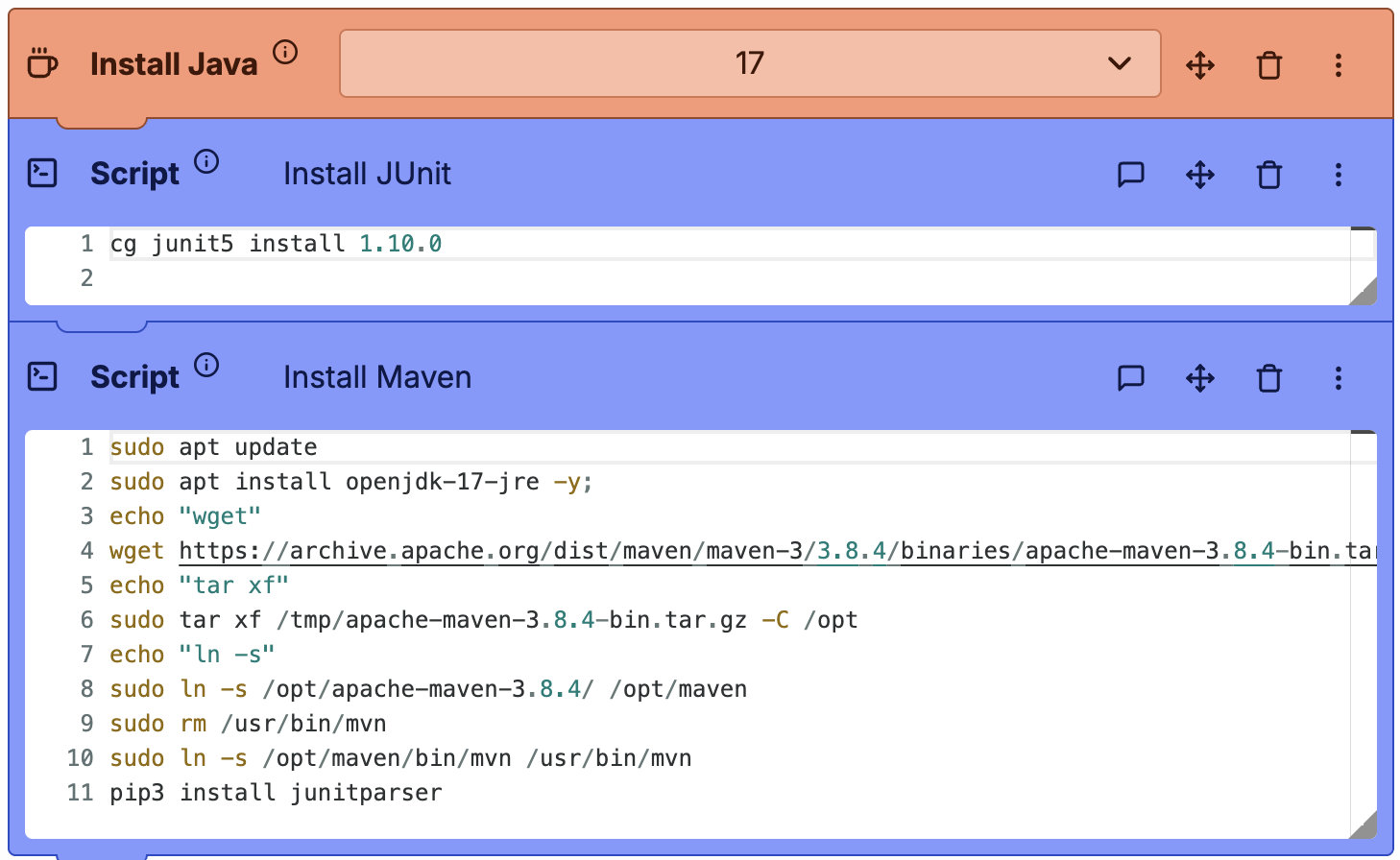
* Add the **Install Java** block (or use the script below).
* Add a **Script** block to install Java 17, Maven 3.8.4, and `junitparser`:
{% code lineNumbers="true" %}
```bash
sudo apt update
sudo apt install openjdk-17-jre -y
wget https://archive.apache.org/dist/maven/maven-3/3.8.4/binaries/apache-maven-3.8.4-bin.tar.gz -P /tmp/
sudo tar xf /tmp/apache-maven-3.8.4-bin.tar.gz -C /opt
sudo ln -s /opt/apache-maven-3.8.4/ /opt/maven
sudo rm /usr/bin/mvn
sudo ln -s /opt/maven/bin/mvn /usr/bin/mvn
pip3 install junitparser
```
{% endcode %}
AutoTest Setup for Maven assignments
***
### Configuring AutoTest Tests
#### 1. Upload and prepare instructor tests
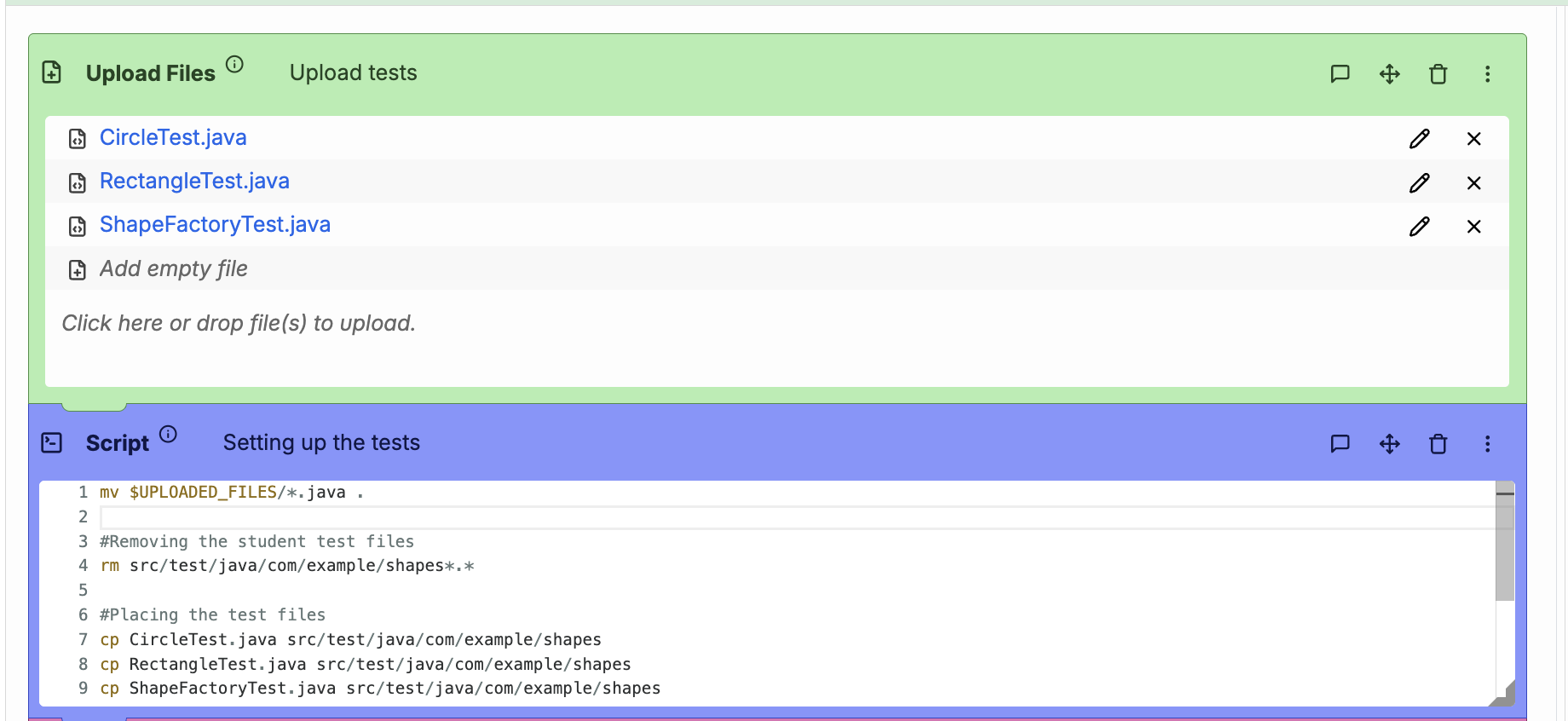
* Upload your test files using an **Upload Files** block (e.g., `CircleTest.java`).
* Use a **Script** block to move them:
```bash
mkdir -p src/test/java/com/example/shapes
cp $UPLOADED_FILES/*.java src/test/java/com/example/shapes
```
{% hint style="warning" %}
Block student-submitted test files in **General Settings > Hand-in Requirements** (e.g., deny `*Test.java`).
{% endhint %}
Upload and prepare tests
#### 2. Prepare build and classpath
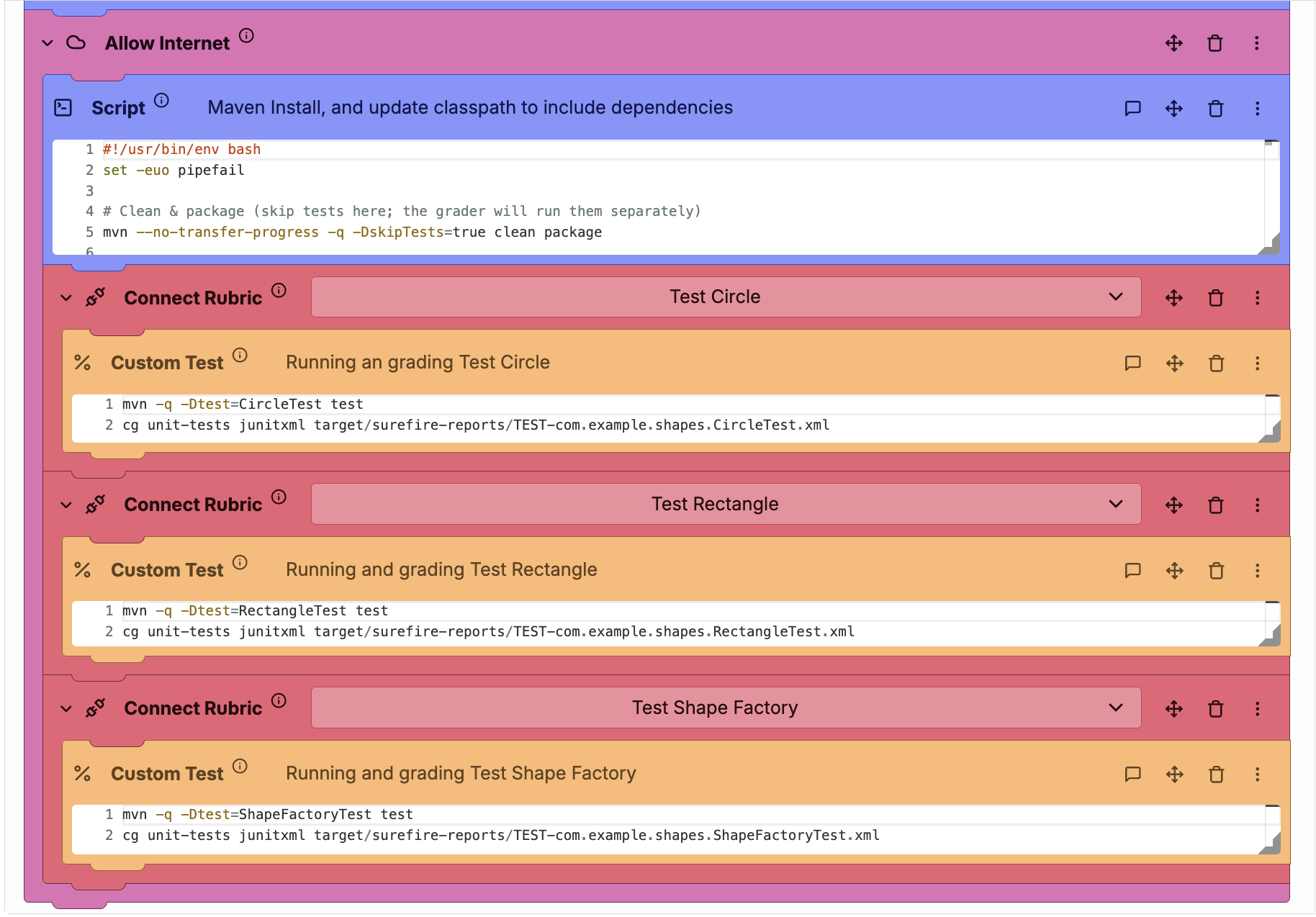
Add a **Script** block to compile and collect dependencies:
```bash
#!/usr/bin/env bash
set -euo pipefail
mvn -q -DskipTests=true clean package
mvn -q dependency:copy-dependencies -DoutputDirectory=target/dependency -DincludeScope=test
DEP_JARS="$(ls target/dependency/*.jar 2>/dev/null | tr '\n' ':' || true)"
SELF_JAR="$(ls target/*.jar 2>/dev/null | tr '\n' ':' || true)"
JAR_PATHS="${DEP_JARS}${SELF_JAR}target/classes:target/test-classes"
CG_CP="$(cg junit5 get-classpath || true)"
echo "export CLASSPATH=\"${JAR_PATHS}${CG_CP:+:${CG_CP}}:.\"" >> ~/.cg_bash_env
echo 'export MAIN_CLASS="com.example.Main"' >> ~/.cg_bash_env
```
{% hint style="info" %}
This ensures all compiled classes and dependencies are available to the test phase.
{% endhint %}
#### 3. Running Maven tests
Use **Connect Rubric** + **Custom Test** blocks for each test class. Each test block can link to a separate rubric category for grading.
```bash
mvn -q -Dtest=CircleTest test || true
cg junitxml target/surefire-reports/TEST-CircleTest.xml
```
{% hint style="info" %}
The project is compiled during the setup phase. Maven automatically skips recompilation when there are no changes.
{% endhint %}
Running Maven tests
***
### Troubleshooting Maven Autograding in CodeGrade
This section lists common issues you may encounter when setting up Maven-based Java assignments in CodeGrade, along with quick solutions.
Maven or Java not found
**Symptom:** AutoTest logs show `mvn: command not found` or `java: command not found`
**Fix:**
* Ensure Java and Maven are installed in the Setup phase.
* Double-check the setup script includes the correct symbolic links to Maven:
```bash
sudo ln -s /opt/maven/bin/mvn /usr/bin/mvn
```
Tests not detected
**Symptom:** Maven runs without executing any tests.
**Fixes:**
* Ensure test class names match `*Test.java` or `*Tests.java`.
* Confirm test files are copied into `src/test/java/...`
* If tests use packages, ensure folders match package structure.
* Use the `-Dtest=ClassName` flag to target specific test classes in test blocks.
Test failures without output
**Symptom:** AutoTest runs but doesn’t show detailed feedback.
**Fix:**
* Verify `cg junitxml target/surefire-reports/*.xml` is included after `mvn test`.
* Ensure the Surefire plugin outputs XML (default behavior).
* Avoid cleaning (`mvn clean`) between test blocks unless needed.
Classpath errors or missing dependencies
**Symptom:** `ClassNotFoundException` or build errors for imported classes.
**Fixes:**
* Run `mvn dependency:copy-dependencies -DincludeScope=test` in Setup.
* Confirm your `pom.xml` includes required dependencies.
* Use the environment setup script to populate `CLASSPATH`.
Timeouts or hanging tests
**Symptom:** Tests hang or AutoTest fails due to long execution.
**Fixes:**
* Use JUnit timeouts (e.g., `@Test(timeout = 2000)` or `assertTimeout()` for JUnit 5).
* Review student code for infinite loops or blocking I/O.
* Set step-level timeouts in AutoTest test block settings.
#### Still Need Help?
For assistance with custom cases, reach out to and share a relevant snapshot or example submission.